Veda2.0 Released!


Database too big
#1

Hello Veda Team,

We'd like to adress a problem we have.

Error Message:

-„Databases too big“

Model:

-Pan European TIMES (30 regions model)

-2664 prc and 809 commodities

- ca. 450 UC’s per country

Description of the problem:

-When we build a database we receive the error message “Databases too big”

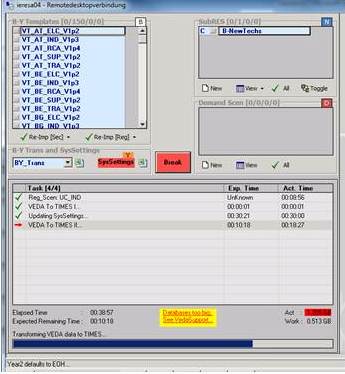
-This happens (for example) at the step “VEDA to TIMES II …” at the sizes of ACT: 1.205GB, WORK: 0.513GB when we synchronize this one single Scenario file


What we tried to solve the problem:

-We split the construction of a new VEDA-FE database into different steps, integrating just the BY-Templates and the B-NEW-Techs in one step, then synchronizing this step and taking it as a base for all other steps where we just add one additional Scenario file (so we can’t make smaller steps)

-We also tried to increase the number of interpolated values, but also this doesn’t work
 

Results:

-Even with this approach the databases are too big (so we can’t build up a database any more)

 Question:

-Are there any possibilities to use bigger databases and to create a new database for a large model in one step?

Would it be possible to migrate to an integrated SQL-Database? The current version of SQL Server 2008 R2 Express Edition supports one processor, one GB RAM  and a max. DB size of 10 GB.

As we have seen, none of the established DB reaches the max size of 2GB. Why do ‘ActiveDB.MDB and VFE_Work.MDB not use the max limit of access.

 Your reply is very much appreciated,

mc

Reply
#2
First of all, I hope you are using the latest version of VFE.

We are looking at using more powerful databases for VEDA applications, but it is on the back-burner.

The first suggestion is to make sure that you are making good use of the powerful interpolation options of TIMES in your model.

If this is not enough, using the proposed "attach model" feature of VFE is the only option. This was presented in the Cape Town meeting.

For your information, my version of the pan-EU TIMES model has half your number of constraints, but very similar number of processes and commodities. The active Db is only about 600 Mb in size. I have another model with 26000 processes, 96 regions, and 6000 constraints (not all in multiple regions) that grows to about 1.3 Gb.
Reply
#3
There is one more thing you can try: don't import all scenarios with UC declarations in one shot.

While importing scenarios, VEDA only reads the "rules" specified for UCs and they are all processed together at the end of the import process (VEDA to TIMES II).

I guess your UCs are already in several different scenario files. So, while starting from scratch, select everything but leave out scenarios that account for about half of your (12,000+?) UCs. After this import finishes, launch another one with the remaining scenarios.
Reply
#4

Hello Veda Support Team,

 many thanks for your reply.

-We are using the latest Version of VEDA (4.3.46).

-We are using the interpolation options wherever possible. In fact, our syssettings is not capable to convey all the interpolation data, that’s why we have an additional syssettings we attach to make sure ALL interpolations are contained in the model.

- We do NOT import all scenarios with UC declarations in one shot. As we explained in our first post, we split the scenario files into steps (we have eight steps now when building up our model). Unfortunately we cannot import ONE SINGLE excel (e.g. UC_IND, as can be seen in the screenshot) containing UC’s (which is the smallest step we can make) without generating the ‘database too big’ error.

-We would like to learn more about the ‘attach model’ feature. Could you kindly provide some more information as we did not find any information on the ETSAP homepage.

-What exactly do you mean by ‘back-burner’?

Greetings,

mc

Reply
#5
- try splitting UC_IND into two files
- I will update the KanORS-EMR proposals on etsap website

Reply
#6
And if you continue to face problems, we can arrange a web meeting to look at your files and generate new options.
Reply
#7
Dear Amit

We are approaching the 'too big database' size issues

In our model, I just started introducing load profile (i.e. COM_FR) for each of the energy service demands as scenario using ~TFM_INS table.

Our model has 144 timeslices, 9 subsectors, each of which have between 4-8 ESD. I began with heating demand, but I am unable to synchronize the database. So I am very concern about this development because we have a long way to go with other EDS. Could you please offer some suggestion to structure the model?

AKanudia Wrote:
If this is not enough, using the proposed "attach model" feature of VFE is the only option. .


I would like to see the 'attached model' approach. Could you please share some details about this. I don't find your presentation from cape town.

Thanks
Reply
#8
I am in the process of documenting this feature; it should be ready early next week.

However, you may be facing issues during intermediate processing steps. These can be avoided by easier means.

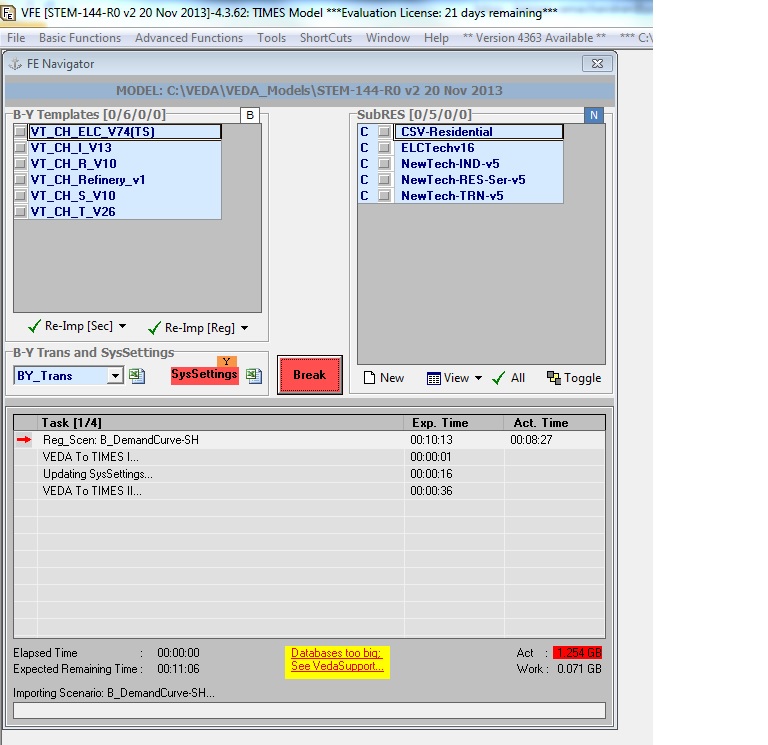
At what point in the SYNC process do you get this error? Please send me a screen shot. And lets schedule a web meeting on Monday?
Reply
#9
here is the scree shot
Reply
#10
OK, but this is just a warning. Does the SYNC complete OK?
Reply
#11
No, the synchronisation is not finished. the VFE is hanging and I have to close it through task manager
Reply
#12
This means that the issue lies with a temp database, as the two main databases seem to be far from the 2GB limit.

you must have a large INS table in this scenario. First option would be to convert it to DINS. If that is not possible, then break it into smaller pieces. How many rows do you have in this table?
Reply
#13
Indeed, we have a number of INS tables each of which has at least 144 rows reflecting the number of timeslices in the model. I am expecting the number of INS table continue to grow in the next couple of days as load curve will be introduced for many more EDS.

We also end up with introducing AFA at timeslice level to mimic tech. usage pattern. For example, driving cycle because we found that model invest on electric car and use all available mileage in summer when electricity is cheap and gasoline cars for winter!

Of course we could split the INS table in different excel file. So far I avoided to do so because we end up with large number of scenario file and bit difficult to manage when we begin to run ‘real’ scenario variants with UC….. perhaps, this table can be moved to the B-Y template once we get the calibration on load curves.

Sorry, I didn’t get you DINS option. Could you please shed some insights on this.
Reply
#14
"DINS" stands for Direct Insert. Without any rules processing.

You can use ~TFM_DINS as the table tag, with the following conditions:
1. there should be no comma-separated entries or wild cards for any of the indexes.
2. All indexes needed for each attribute should be specified.

These tables are processed in a fraction of the time taken by INS tables, and this will also resolve your size issue.
Reply
#15
Amit

good to know about DINS something new to me. Thanks

I will check whether we can change some tables to DINS, as one third of our table could fulfill the setout condition
Reply


Possibly Related Threads…
Thread Author Replies Views Last Post
Photo Result Database Not Generated nadhilah.reyseliani81 9 16,133 28-02-2020, 07:20 PM
Last Post: Ravinder
  Database too big Aymane 2 6,613 24-01-2019, 10:20 PM
Last Post: Aymane
  Error with Access database engine alexx 4 12,063 01-05-2018, 08:41 PM
Last Post: Vikrant
  Database Error for FLO_EMIS parameter for all NewTechs Tanzeel 0 3,983 02-02-2017, 10:26 PM
Last Post: Tanzeel
  Cannot modify design of Table 'Error_Table'. It is in a read only database. utsavjha 0 4,591 08-06-2016, 06:31 PM
Last Post: utsavjha
  NCAP_PASTY is still missing from the database vangelis 0 4,172 18-05-2014, 09:54 AM
Last Post: vangelis
  VFE: Database too big Vincent 5 14,354 28-10-2011, 02:09 PM
Last Post: AKanudia

Forum Jump:


Users browsing this thread: 1 Guest(s)